Introduction
If you’ve been working in GA4 for a while, you’ve likely faced this question:
If I’m already sending a parameter with my event, why do I need to create a custom dimension?
It sounds simple but this confusion is one of the biggest causes of messy reporting, unused data, and hitting the 50 custom dimension limit in Google Analytics 4.
Let’s clarify this.
What Are GA4 Event Parameters in Google Analytics?
In GA4, everything is event-based.
Each interaction like page_view, purchase, add_to_cart, form_submit is an event.
Event parameters are the additional pieces of context sent along with those events.
For example:
Event: purchase
Parameters:
- transaction_id
- value
- currency
- user_category
- coupon_code
GA4 event parameters are simply key-value pairs that provide additional detail about the event.
Important:
Google Analytics automatically collects and stores these parameters. You do not need to create anything extra for them to exist.
However…
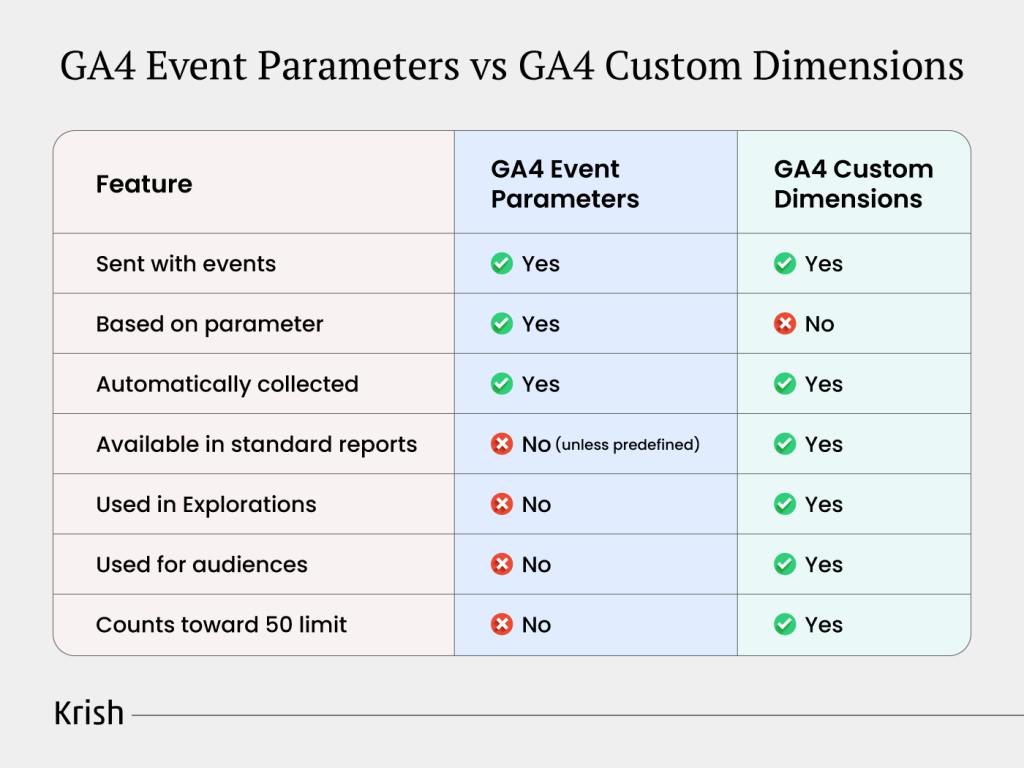
By default, you cannot use most custom event parameters in standard reports or Explorations unless you register them as custom dimensions.
That’s where reporting gaps begin.
It’s one of the most common GA4 configuration issues discussed in our guide on critical GA4 configuration mistakes costing revenue.
What Are GA4 Custom Dimensions?
GA4 custom dimensions are reporting definitions built on top of event parameters (or user properties).
Think of it like this:
- Event parameter = raw data collection
- Custom dimension = reporting layer
When you create a custom dimension in Google Analytics, you’re telling GA4: “Make this parameter available for reporting, filtering, segmentation, and analysis.”
Without creating a GA4 custom dimension, the parameter exists in the background but you can’t use it in:
- Standard reports
- Explorations
- Comparisons
- Audience building
- Attribution analysis
This is why many teams feel like their data “isn’t showing up.”
It is collected, just not registered for reporting.
GA4 Event Parameters vs GA4 Custom Dimensions (Side-by-Side)
When Should You Create GA4 Custom Dimensions?
Here’s the rule of thumb:
Create a Google Analytics custom dimension only if it supports recurring business analysis.
Ask yourself:
- Will we regularly segment reports by this?
- Will it drive optimization decisions?
- Will we build audiences from it?
- Will it influence attribution or funnel analysis?
If the answer is yes, register it.
Examples of Good Custom Dimension Use Cases
- user_category (B2B vs B2C)
- plan_type (Free vs Paid)
- checkout_type (Guest vs Logged-in)
- content_author (For content performance analysis)
- subscription_tier
These parameters influence business questions like:
- Which user segment converts better?
- Do paid users behave differently?
- Does guest checkout reduce conversions?
That’s strategic reporting.
For a deeper implementation checklist, you can refer to our detailed GA4 audit guide and best practices.
Further reading
Free ebookThe DIY 20-Point GA4 Audit Checklist for Enterprises
Spot tracking gaps, fix attribution blind spots, and score your GA4 setup across 20 checks — with a clear priority order for fixes ranked by business impact.
When You Do NOT Need a Custom Dimension
Not every event parameter deserves to become a GA4 custom dimension.
Avoid creating one for:
- Debug flags
- Temporary experiment IDs
- Implementation markers
- Rarely analyzed metadata
- One-off campaign tests
- Parameters used only for BigQuery exports
A common mistake in Google Analytics implementations is creating custom dimensions “just in case.”
That mindset leads directly to hitting the 50 event-scoped custom dimension limit.
Understanding the GA4 Custom Dimension Limit
Google Analytics 4 allows:
- 50 event-scoped custom dimensions
- 25 user-scoped custom dimensions
Once you hit the limit, you must archive old ones before creating new ones.
And here’s the problem:
Archiving a custom dimension does not restore historical data in reports for that dimension.
So poor planning creates long-term reporting gaps.
Why do teams hit the limit?
- No measurement strategy
- Over-registering parameters
- Confusion between event-scoped and user-scoped
- Lack of governance
- No periodic audit
Most GA4 setups don’t suffer from lack of data, they suffer from lack of discipline.
This is exactly why structured GA4 audit services become essential once properties scale.
Event Scope vs User Scope: Another Critical Decision
When creating GA4 custom dimensions, you must choose scope:
Event-scoped
Applies to a specific interaction.
Example:
- checkout_type on purchase event
User-scoped
Applies to a user across sessions.
Example:
- user_category (B2B vs B2C)
Choosing the wrong scope leads to misleading analysis.
If you register something as event-scoped when it should be user-scoped, segmentation becomes inconsistent across sessions.
This is another common implementation flaw in Google Analytics.
What About BigQuery?
If your GA4 property is connected to BigQuery, you may not need to create custom dimensions for every parameter.
BigQuery exports contain raw event parameter data automatically.
So if:
- The parameter is used rarely
- It’s needed only for deep analysis
- It supports data science workflows
You can skip registering it as a GA4 custom dimension.
This approach preserves your dimension quota for high-value reporting fields.
A Practical Decision Framework
Before creating a GA4 custom dimension, ask:
- What business decision will this support?
- How often will we report on it?
- Does it belong at event scope or user scope?
- Could BigQuery handle this instead?
- Is this temporary or strategic?
- Will stakeholders actively use this breakdown?
If you cannot answer at least two of those clearly, don’t register it.
Data collection without reporting intent leads to noise.
Common Implementation Mistakes in Google Analytics
Here are the patterns we often see in misconfigured GA4 properties:
- Registering every event parameter as a custom dimension
- Mixing user and event scopes incorrectly
- No naming convention governance
- No documentation of why a dimension exists
- Never auditing unused dimensions
Over time, this creates reporting clutter, confusion, and inconsistent attribution.
A structured GA4 measurement strategy prevents this from happening.
Why This Matters More Than It Seems
At first glance, GA4 custom dimensions vs event parameters feels technical.
But it’s actually a strategic issue.
If your reporting layer is poorly structured:
- Funnels become unreliable
- Segmentation becomes inconsistent
- Attribution analysis breaks
- Optimization decisions become guesswork
Google Analytics is not just about collecting data, it’s about making structured decisions.
And custom dimensions are the bridge between raw tracking and business insight.
Frequently Asked Questions
Are GA4 event parameters automatically available in reports?
No. Google Analytics collects event parameters automatically, but you must register them as GA4 custom dimensions to use them in standard reports or Explorations.
What happens if I don’t create a Google Analytics custom dimension?
The parameter will still be collected, but you won’t be able to filter, segment, or build audiences using it in GA4.
What is the limit for GA4 custom dimensions?
GA4 allows 50 event-scoped and 25 user-scoped custom dimensions per property.
Does archiving a custom dimension restore the slot?
Yes, it frees up the slot. However, historical reporting tied to that dimension may no longer function properly.
Final Takeaway
Here’s the simplest way to think about it:
Event parameters collect information and GA4 custom dimensions make that information usable.
Create custom dimensions only for parameters that drive recurring business analysis.
If it helps with segmentation, optimization, attribution, or audience building then you should register it.
If it’s just “nice to have,” leave it as a parameter.
Structured reporting beats excessive tracking every time.
Table of Content
- Introduction
- What Are GA4 Event Parameters in Google Analytics?
- What Are GA4 Custom Dimensions?
- GA4 Event Parameters vs GA4 Custom Dimensions (Side-by-Side)
- When Should You Create GA4 Custom Dimensions?
- When You Do NOT Need a Custom Dimension
- Understanding the GA4 Custom Dimension Limit
- Event Scope vs User Scope: Another Critical Decision
- What About BigQuery?
- A Practical Decision Framework
- Common Implementation Mistakes in Google Analytics
- Why This Matters More Than It Seems
- Frequently Asked Questions
- Final Takeaway
Subscribe with Us!
Never miss any post, stay tuned!

As Director - Marketing, Zenul leads the marketing and branding at Krish. He brings with him an in-depth understanding of the evolving digital ecosystem and has a proven expertise and experience in strategic planning, market and competition analysis, creating and implementing client-centered, lead-gen and brand marketing campaigns. He has a heart for technology innovation and has been a keynote speaker on various platforms.
Recommended Reading:
Predictive Analytics 101: Moving From Hindsight to Foresight – MarTech Masterclass Series Ep | 19
9 July, 2026 Most MarTech stacks are architecturally optimized for one thing: describing the past. Revenue last quarter, churn in the last 90 days, campaign performance last week - the dashboards are polished and the data looks clean. Yet every output from that stack is a response to something that has already happened. The customer already churned. The demand spike already passed. The high-value cohort already drifted before anyone noticed.
Subscribe with Us!
Never miss any post, stay tuned!
Trusted by leading brands


